


MobileSheets
4.7548.00 Reviews
App Specs
- Version
- 3.9.43 (Build 592)
- Updated On
- License
- $15.99
- Downloads
- 100,000+
- Developer
- Zubersoft
- Categories
- Music & Audio
- Platform
- Android, iOS
Screenshots
 Analysis by AppCompare
I often think of a music app as a personal tool, but sheet music is regularly shared: a tablet may move between a parent’s piano practice, a student’s lesson, and a rehearsal at home. MobileSheets is built around managing a musician’s library and working with scores on a device, so it can make that shared routine more organized. The key is treating the library as something that needs clear ownership and preparation, rather than assuming everyone will use it in exactly the same way.
One tablet, several musical routines
A realistic household use is a player preparing a setlist before rehearsal, then handing the device to someone else for a lesson or practice session. A digital score avoids carrying a separate pile of paper for every activity, and annotations can keep reminders attached to the piece they concern. That is useful when a musician wants to mark a fingering or a difficult passage without writing on a paper original.
Shared use works best when people agree on what the marks mean. A pencil-style reminder for one player can be confusing to another, especially if both use the same copy. I would keep personal interpretation notes distinct in a shared routine—perhaps by maintaining separate copies when that suits the library—rather than assuming annotations automatically belong to individual household members. A little naming discipline can prevent a useful library from becoming a collection of near-identical files.
This kind of setup is most appealing when the household already plays from digital scores and the tablet is a regular part of practice. It is less compelling if everyone only needs to view an occasional page: opening a score in a basic document reader may be quicker than building a catalog and learning dedicated music tools.
Decide who manages the library
Before importing a large collection, I would choose one person to establish the library’s structure and decide how new material gets added. A consistent approach to composer names, piece titles, and tags makes searches and setlists more dependable later. If several people add scores independently, the same work can end up under different spellings or as duplicate entries, which makes a carefully organized collection harder to browse.
It also helps to decide which device holds the authoritative version of a score. Cloud syncing can be convenient across devices, but shared access still needs a human routine: agree who edits a file, when changes are made, and how the group handles revised markings. Syncing is not a substitute for communication, and I would avoid making last-minute changes on several devices at once if everyone relies on the same repertoire.
For a family or small ensemble, a practical workflow is to prepare and check a setlist before a lesson or rehearsal, then leave the performance copy stable. If someone needs to experiment with notes or page layout, doing that in a separate working copy reduces the chance of changing the version another player expects to see. This is a simple habit, but it matters more than adding elaborate categories to a library.
Worth Reading Before You Choose

EA SPORTS FC Mobile 26 Is a Bigger Football Game, but It Takes Time

Flipboard Shows What News Apps Must Do Beyond the Feed

Switching to Android Auto Means Rethinking Your Driving Routine

Google Calendar Makes a Crowded Week Easier to Manage

Ludo King Makes the Most of the Minutes Between Plans

Baby Panda World Brings Quick Play to Modern Phones, but Its Game Library Feels Busy
Age, trust, and realistic expectations
The app has an Everyone age rating, and its purpose is musical rather than social or entertainment-focused. That makes it a reasonable option for a household with younger learners who use a device for scores, but the rating does not answer every practical question about a family’s device arrangements. Adults should still set ordinary expectations around shared tablets, account access, purchases, and who is allowed to alter a common music collection.
I would not treat it as a family-management tool. Its value here is helping musicians handle scores, notes, and practice materials; household boundaries need to come from the people sharing the device. A younger player may appreciate being able to mark a challenging bar, while a parent or teacher may prefer to keep a clean reference copy. Agreeing on that distinction makes the tools more useful and avoids turning a practice aid into a source of confusion.
There is also a difference between a child learning a few songs and a serious student building a large repertoire. The former may be perfectly happy with printed pages or a simple viewer. The latter is more likely to benefit from searchable organization, setlists, annotation, and performance-oriented handling. I would base the choice on how often the musician needs to retrieve, mark, and perform from scores, not just on the fact that the device is shared.
Getting Started with MobileSheets
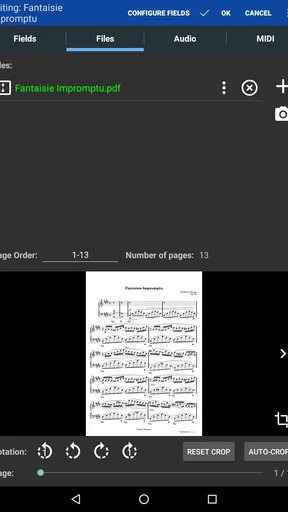
The first thing I noticed when diving into MobileSheets is its user-friendly interface. Setting it up was a breeze, and even if you're not a tech whiz, you'll find it pretty straightforward. The app allows you to import your sheet music effortlessly from various sources like your device, cloud services, or even directly from your computer. Just a few taps and you're ready to roll!
Features that Hit the Right Notes
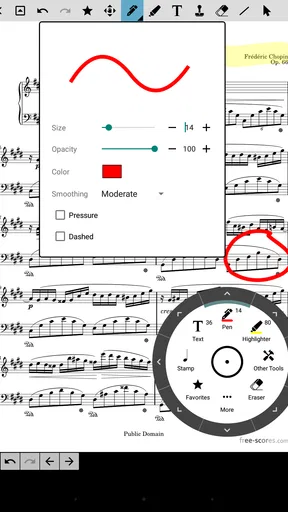
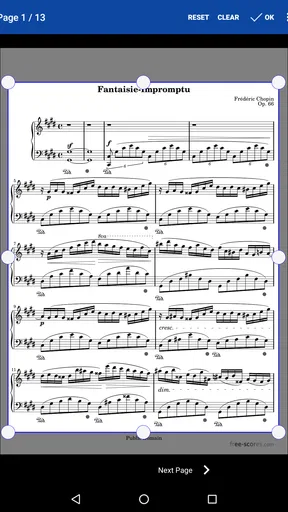
One of the standout features for me has to be the annotation capabilities. Whether you want to jot down a quick note or highlight a tricky passage, MobileSheets makes it super easy. The annotation tools are intuitive, offering everything from basic pen and highlighter functions to more advanced options like text and shapes. It’s like having a digital conductor’s baton in your hand!
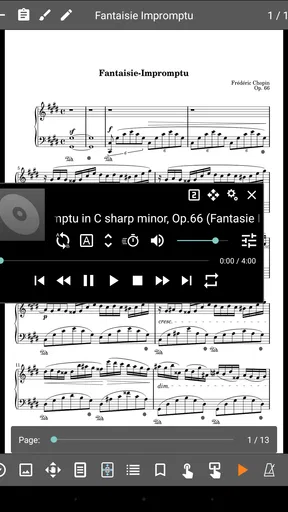
Another cool feature is the metronome and audio playback. Practicing with these tools is a game-changer. You can adjust the tempo and even loop sections to nail those challenging parts. Plus, if you're syncing audio tracks with your sheet music, the app supports that too—perfect for those learning new pieces by ear.
Seamless Integration and Customization
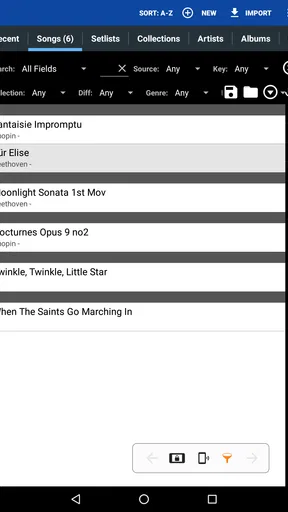
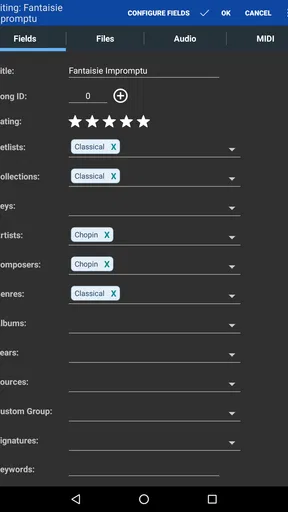
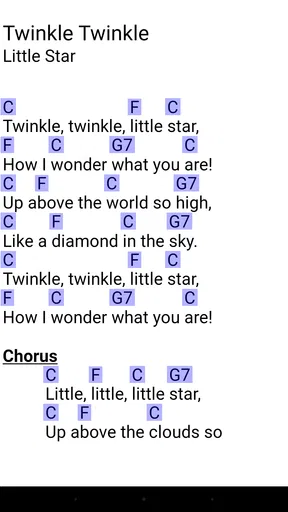
Customization is where MobileSheets really shines. You can organize your music library into setlists, categorize by genre or composer, and even tag pieces for easy searching. I found this particularly handy for gigs with varied repertoire. The app also supports various file formats, so whether you're working with PDFs, images, or text files, you’re covered.
For those of you who love gadgets, MobileSheets integrates nicely with Bluetooth page turners. It's a lifesaver when you need to keep your hands free while performing. No more awkward pauses to flip pages—just tap your foot and keep playing!
Performance and Connectivity
Performance-wise, the app runs smoothly, which is crucial during performances. The last thing you need is your sheet music app crashing mid-concert. With MobileSheets, I experienced no such hiccups. It handled my extensive library without a hitch.
Connectivity options are robust, too. Cloud syncing ensures all your devices stay updated, and you can easily share sheet music with bandmates or students. The app supports Google Drive, Dropbox, OneDrive, and more, making it a versatile tool for both solo musicians and ensembles.
What to consider before relying on it
The strengths here are most obvious when a score has a job beyond simply displaying notes. For example, I would use a setlist to prepare a rehearsal in playing order, then tag pieces in a way that helps find them again by composer or style. Those are different routes to the same library: setlists answer “what am I playing next?” while tags help answer “where did I put that piece?” Keeping the two purposes separate can make browsing faster under pressure.
Annotations are most useful when they are deliberate. I would mark only information that helps during the next practice or performance—an entrance, a cue, or a passage to revisit—rather than filling every page with temporary thoughts. If you are learning a piece by ear, pairing its score with audio playback and looping a difficult section gives practice a more focused shape than repeatedly starting from the beginning. The trade-off is that these tools reward preparation; they do not remove the need to decide what to practice.
A page turner can change how comfortable a tablet feels during a performance, but it is another piece of equipment to pair and test before the event. I would check the device, the score order, and the turning workflow during rehearsal rather than discovering a problem on stage. If you usually play from a music stand with one hand free and few page changes, the extra accessory may not be worth adding to your setup.
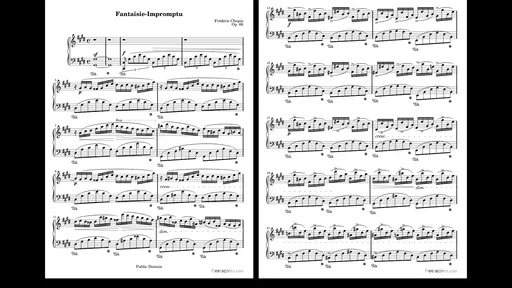
Compared with a basic PDF reader, this app is the more involved choice: the appeal is not merely opening a score, but combining a music library, annotations, setlists, and practice tools in one workflow. A simple reader is often better for someone who already has a tidy folder and only needs to view documents. Printed music remains a sensible option for musicians who prefer paper, want to avoid a device on the stand, or do not need searchable organization. I see the dedicated app as most worthwhile when scores are used often enough that managing them becomes part of the work.
Who will get the most from it
MobileSheets is aimed at musicians who regularly move between pieces: performers with changing programs, students building a repertoire, teachers preparing material, and players who want annotations close at hand. It can also suit a household where more than one person practices, provided they agree on how to organize shared material. The ability to assemble setlists is especially useful when a rehearsal or gig includes a varied sequence rather than one book used from cover to cover.
I would hesitate to recommend it to someone who owns only a handful of scores and rarely changes them. The purchase and setup may feel like unnecessary work if a free, familiar document viewer already meets that person’s needs. Likewise, someone who strongly prefers paper or does not want to depend on a tablet during performance may be happier with printed music. A feature-rich music library is valuable only if it solves a recurring problem.
For a new user, the most approachable way to begin is to import a small group of scores rather than the entire archive, then make one setlist and try the annotation and practice tools on material already in use. That gives a clear sense of whether the organization fits your habits before you spend time sorting everything. Once the workflow feels natural, expanding the library is less likely to become a weekend-long filing project.
A Few Notes to Keep in Mind
While I've mostly sung praises, it's worth mentioning that MobileSheets is a premium app, meaning it comes with a price tag. However, considering the features and convenience it offers, I’d say it’s a worthy investment for serious musicians. There’s also a bit of a learning curve if you want to master all its features, but once you do, it's smooth sailing.
It costs $15.99, so I would weigh that against how often you perform or practice from digital scores. The app has a 4.5 average from around 4,500 ratings, and it has passed 100,000 installs; those figures suggest that it has found an audience, but they do not tell me whether its workflow will suit a particular player. It is made by Zubersoft, is rated for Everyone, and its current release is version 3.9.33, build 576. It first appeared on April 13, 2015, and runs on Android 7.0 or later.
The app is available for both Android and iOS, so no matter your device preference, you can join the digital sheet music revolution.
How I would decide for a shared household
If you are wondering whether one purchase can simplify everyone’s music routine, I would start with the actual pattern of use. How many times a week does someone search for a score, prepare a sequence, or need to mark a passage? If the answer is often, the library and practice features can earn their place. If the tablet is passed around only occasionally to read a single page, a simpler viewer or paper may be less trouble.
I would also make the first shared session a short trial: choose a few scores, create a rehearsal setlist, and let each player see how annotations and browsing feel. That reveals practical friction early—such as inconsistent naming or unclear ownership of markings—without requiring a full archive migration. A household that agrees on those small conventions is more likely to enjoy the convenience than one that expects the app to coordinate people automatically.
There are 494 written reviews, and the app’s release history gives it a long presence in the music category, but my recommendation still depends on the player’s habits. The strongest case is for someone who treats a tablet as an active music stand and wants more than a plain page display. For casual score viewing, the extra depth may be overkill; for frequent rehearsals and changing programs, it can turn a scattered collection into a more usable working library.
In conclusion, if you're looking to simplify your musical life, MobileSheets might just be the answer. It’s packed with features that make managing and playing sheet music a breeze. Whether you’re practicing at home or performing on stage, this app offers a seamless experience that can enhance your musicianship. Give it a try, and who knows? It might just become your new favorite practice partner!
Pros
- Highly customizable sheet music options.
- Supports a wide range of file formats.
- Integrated metronome for practice sessions.
- Easy cloud backup and sync features.
- Annotation tools are intuitive and versatile.
Cons
- Initial setup can be time-consuming.
- Limited free version features.
- Occasional sync issues with some devices.
- Interface may be overwhelming for beginners.
- Requires a subscription for full access.
FAQs for MobileSheets
What is MobileSheets and who is it for?
MobileSheets is a versatile sheet music reader app designed for musicians who want to digitize their music collections. Ideal for performers, teachers, and students, it allows users to easily manage, view, and annotate their sheet music on tablets or smartphones, eliminating the need for physical sheet music books.
Is MobileSheets available for both Android and iOS devices?
Yes, MobileSheets is available for both Android and iOS platforms. Users can download the app from the Google Play Store or the Apple App Store, ensuring compatibility with a wide range of devices, including tablets and smartphones. This makes it accessible for most musicians regardless of their device preference.
What features does MobileSheets offer to enhance the music reading experience?
MobileSheets provides an array of features such as customizable setlists, easy page turning, and various annotation tools. Users can import PDFs and images, and even connect to MIDI devices for automated page turning. The app also supports audio playback, allowing musicians to practice alongside their music.
How user-friendly is MobileSheets for beginners?
MobileSheets is designed with a user-friendly interface that caters to both beginners and advanced users. It offers intuitive navigation and easy-to-use tools for organizing and annotating music. A comprehensive help section and tutorial videos are available to assist new users in getting started quickly and efficiently.
Does MobileSheets support cloud storage and synchronization?
Yes, MobileSheets supports cloud storage and synchronization, allowing users to back up and access their music library across multiple devices. This feature ensures that changes made on one device are updated on all others, providing a seamless experience for users who switch between devices frequently.


